


Rippling - HR, IT & Finance
4.4561.00 Reviews
App Specs
- Version
- 3.0.47
- Updated On
- License
- Free
- Downloads
- 100,000+
- Developer
- People Center Inc.
- Categories
- Business
- Platform
- Android
Screenshots
 Analysis by AppCompare
I usually judge a workplace app by a simple question: does it remove enough small decisions from my day to justify opening it? Rippling - HR, IT & Finance is aimed at that problem. It brings employee-related tasks into one mobile experience instead of leaving me to remember separate places for benefits, expenses, time off, and other work administration. That makes it especially interesting for people whose work life is spread across several systems.
In my experience, the appeal is less about spending all day inside the app and more about having a dependable checkpoint. I can use it to see what needs attention, record something while it is fresh, and return later without rebuilding the context from email threads or paper notes. The real value is a cleaner routine for workplace administration, not another app demanding constant attention.
A practical review of Rippling for everyday work administration
I focus on how Rippling brings routine workplace administration into one mobile checkpoint, and why that can make small tasks easier to capture before they slip. The key is to treat it as part of an employer’s established process, not as a replacement for every work system. Next, I look at how that approach fits into an ordinary week.
Before using it, the workflow is usually more scattered
Without a central employee app, a normal week can involve several small searches. I might look through email for a benefits document, open a browser to request time off, find a receipt in my camera roll, and then ask a manager or HR contact whether the request went through. None of these tasks is especially difficult, but the switching creates friction and makes easy-to-forget items feel more important than they are.
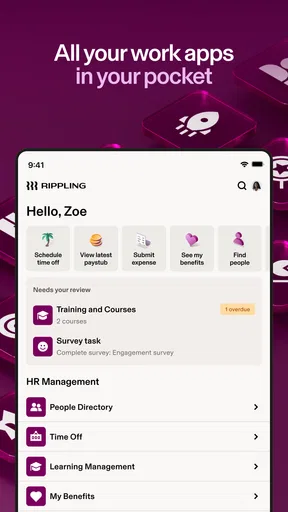
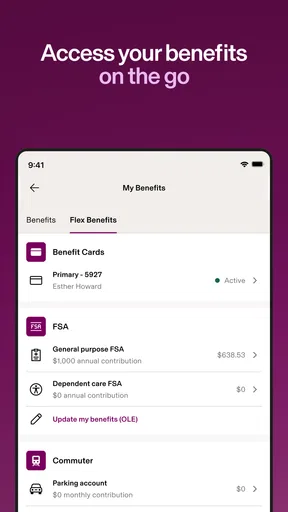
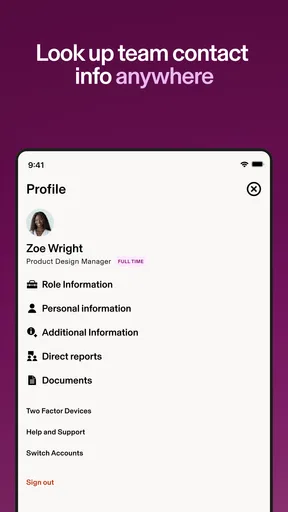
Rippling, developed by People Center Inc., is designed for that kind of scattered workflow. Its focus covers HR, IT and finance administration, with the store summary pointing to benefits, expenses and paid time off. I see it as a companion to an employer’s wider Rippling setup rather than a standalone personal productivity tool. That distinction matters: the app is most useful when my organization has already connected the relevant workplace processes.
A realistic example is a Monday morning after a business trip. I have a meal receipt still sitting in my phone, need to check whether my time-off request was recorded, and want to review a benefit detail before choosing an option. Instead of treating each item as a separate project, I can use the app as one place to capture the expense, check the request, and locate the information I need. The time saved may be modest, but the reduction in uncertainty is meaningful.
That does not mean every employee will experience the same breadth of tools. The useful parts depend on what an employer has enabled and how its internal processes are configured. I would not install it expecting a universal personal finance manager or a replacement for every HR conversation. Its job is to connect workplace actions that already belong to an organizational system.
Worth Reading Before You Choose

EA SPORTS FC Mobile 26 Is a Bigger Football Game, but It Takes Time

Flipboard Shows What News Apps Must Do Beyond the Feed

Switching to Android Auto Means Rethinking Your Driving Routine

Google Calendar Makes a Crowded Week Easier to Manage

Ludo King Makes the Most of the Minutes Between Plans

Baby Panda World Brings Quick Play to Modern Phones, but Its Game Library Feels Busy
Capture first, organize before small tasks disappear
The strongest habit I would build around this app is immediate capture. When I pay for an approved work item, I do not want to rely on memory at the end of the month. When I decide to take leave, I want the request entered while the dates are clear. When I receive a benefits question, I want to look for the relevant information before asking someone else to repeat it.
This is where the mobile format makes sense. A phone is usually nearby when a receipt is created or a scheduling decision is made. Using the app at that moment turns an administrative task into a short action rather than a backlog item. I find that more sustainable than keeping a growing list called “submit expenses” or “check PTO” and hoping I will process it later.
My practical workflow would be to handle each item according to its next action. An expense needs to be recorded while the receipt is available. A time-off request needs dates and a quick review before submission. A benefits question may need reading first and asking for help second. Keeping those actions separate prevents a common mistake: opening the app without knowing what outcome I want.
Another useful approach is to treat the app as a source of record, not merely a notification surface. After submitting something, I would return to confirm its status rather than assuming that tapping a button completed the entire process. That small check is particularly valuable for leave and expense requests, where a pending item can affect planning even if the initial entry was correct.
I also prefer to group administrative work into natural moments. I might capture a receipt immediately, then review all outstanding items during a short end-of-week check. This balances speed with attention. Capturing everything later is risky, but constantly reopening the app can fragment the workday. Rippling fits best when it supports a rhythm of quick entries followed by deliberate review.
A repeatable routine is more useful than constant checking
For me, the sustainable setup would have three parts. First, I would enter time-sensitive information as soon as it happens. Second, I would reserve a regular moment to review expenses and requests. Third, I would use the app when a benefits or workplace administration question appears, instead of postponing it until the answer becomes urgent.
This routine also clarifies what the app should not become. I would not use it as a general task manager for every project or meeting. Its advantage comes from keeping employee administration together. Adding unrelated reminders would make the experience less focused and weaken the reason to use it.
The app can also help create a cleaner handoff between employee action and organizational processing. I can submit what belongs to me, check whether it remains in progress, and recognize when a question needs a manager or HR representative. That boundary is important. A digital workflow can make a request visible and organized, but it cannot replace a human decision when a policy needs interpretation.
For someone managing several responsibilities, this separation reduces mental load. I can distinguish “I need to submit this” from “someone else needs to approve or explain this.” That is a small but non-obvious benefit of using a unified workplace system: it gives me a clearer picture of where the next move belongs.
The app is free to download, and its content rating is Everyone, which makes it approachable for a broad workplace audience. I would still judge it by the quality of the employer’s setup. A polished mobile interface cannot compensate for unclear internal rules, delayed approvals, or benefits information that has not been maintained.
Where the experience can become frustrating
The first failure point is assuming that one app automatically means one complete answer. Rippling can gather workplace functions, but the underlying process still depends on company configuration. If an option is unavailable, a request is routed differently, or information looks incomplete, I may need to contact the appropriate workplace team rather than repeatedly searching the app.
The second is treating submission as completion. An expense can be entered accurately and still require review. A time-off request can be sent and still need approval. My advice is to check the state of important items and keep a simple personal note of dates when the consequence of delay would be serious. This is not a criticism unique to Rippling; it is a necessary habit for any approval-based workplace tool.
The third problem is notification fatigue. If I respond to every alert immediately, the app becomes another source of interruption. I would keep urgent workplace actions separate from items that can wait for my weekly review. The best productivity system is not the one with the most checking; it is the one that makes the right checking predictable.
There is also a learning curve caused by context. A person new to the employer may not know which section handles a particular request or what language the organization uses for its processes. I would spend a few minutes learning the app’s layout during a calm period, then save questions for one clear message to HR or a manager. That is more efficient than guessing repeatedly.
Finally, a unified app may feel excessive for someone who rarely submits expenses, never manages leave through a phone, and already has a simple employer process. In that situation, a browser page or direct conversation might be faster. Rippling’s advantage grows with the number of employee tasks I need to coordinate; it is less compelling when my workplace administration is minimal.
How it compares with familiar alternatives
The usual alternatives are a collection of email messages, spreadsheets, browser portals and separate expense or benefits tools. Those options can work, especially in a small organization with clear procedures, but they make me responsible for remembering where each task belongs. Rippling’s main difference is the attempt to put related employee actions behind one consistent mobile entry point.
Compared with email, the app is better for structured actions such as submitting an expense or requesting time off. Email remains better for explanations, unusual situations and decisions that need a written conversation. I would not try to force a policy question into a form if the important part is describing context.
Compared with a spreadsheet, Rippling should be more appropriate for information that belongs in an employer-managed workflow. A spreadsheet may help me track personal planning, but it should not become my substitute for submitting an official request. I would use a private note only as a backup reminder, never as the authoritative status.
Compared with separate specialist apps, the trade-off is concentration versus depth. A dedicated expense tool may feel more focused for someone who handles a large volume of reimbursements, while Rippling is more convenient when expenses sit alongside PTO and benefits. A browser portal may offer a wider desktop view for complex review, but the phone app is more useful when the task begins away from a desk.
That makes the choice situational. I would choose Rippling when I want one workplace routine and my employer supports the relevant areas. I would prefer a separate tool or direct HR process when a task is unusually detailed, when the organization’s setup is incomplete, or when I need a specialized workflow rather than a shared employee hub.
What the current app details tell me
The app has been available since June 15, 2017, and its current version is 3.0.46. It supports devices running Android 8.0 or later. Those details suggest that compatibility should be checked before relying on it for work, particularly if I use an older phone or a device that cannot receive current operating-system updates.
Its average rating is 4.4 from around 4.4 thousand ratings, with around 560 written reviews, and it has passed 100 thousand installs. I read that as evidence of a meaningful user base, not as a guarantee that every employer configuration will feel the same. Workplace software is unusually dependent on setup, permissions and internal policy, so broad popularity cannot answer every practical question.
The free price is another reason it is easy to try, but I would separate download cost from workplace usefulness. The important question is whether my organization uses Rippling for the tasks I actually need. If the app opens into a limited set of functions while the rest of my work remains elsewhere, the experience may not justify changing my routine.
Who should adopt it, and who should skip it
I would recommend Rippling to employees who regularly handle a mixture of benefits, expenses and PTO, especially when those tasks currently live in different places. It is also a good fit for people who work away from a desk and want to capture administrative actions while they happen. Managers and HR teams may find the unified approach useful for directing employees toward a consistent process, although the employee experience still depends on how thoughtfully that process is configured.
It suits a person who values closure. I like being able to enter an item, review its state, and know whether my next step is mine or someone else’s. That clarity is more important than having a long list of features. If I am trying to build a calmer work system, the app can serve as the administrative inbox while my calendar and task manager handle everything else.
I would be more cautious if my employer has not fully adopted the platform, if most requests require personal explanation, or if I need advanced specialist tools. Someone who only checks PTO once a year may not gain much from another mobile app. Likewise, employees who prefer desktop forms for detailed entries may find the phone-first workflow less comfortable for larger batches.
My best advice is to start with one recurring task rather than moving everything at once. I would use it for expense capture or time-off requests, observe where the process ends, and then add benefits-related checks if they are genuinely useful. This gradual approach reveals whether Rippling reduces effort or simply gives me another place to look.
My final take on a calmer administrative system
After looking at it as part of a wider productivity routine, I see Rippling as a practical workplace hub rather than an app I would open for entertainment or general planning. Its strength is the connection between everyday employee needs: recording expenses, checking leave, reviewing benefits and handling related administration from a familiar mobile location.
I would not promise that it eliminates every question or replaces HR support. It cannot fix unclear policies, missing employer configuration or approval delays. What it can do is make my part of the process more visible and repeatable, particularly when I capture information promptly and review pending actions on a regular schedule.
For employees whose companies already rely on the platform, I think it is worth adopting as a focused checkpoint. Use it when an action is created, verify important submissions, and keep broader work out of it. With that boundary, the app has a sensible place in a sustainable productivity system. My recommendation is positive for connected workplaces, but conditional on the employer’s setup and the user’s actual need for centralized HR administration.
Pros
- Combines HR
- payroll
- IT
- and finance tools in one platform.
- Automates onboarding
- offboarding
- and employee lifecycle tasks.
- Supports integrations with many workplace and business applications.
- Offers detailed employee data and workflow customization options.
- Useful for managing distributed and international teams.
Cons
- Pricing can be difficult to estimate without a tailored company quote.
- The broad feature set may feel overwhelming for smaller businesses.
- Some features require separate modules or additional subscriptions.
- Payroll and benefits availability varies by country and region.
- Employees may need training to navigate the platform effectively.
FAQs for Rippling - HR, IT & Finance
What is Rippling, and what can I use it for?
Rippling is a business platform that brings HR, IT, and finance-related tools together in one place. Depending on the services enabled by your employer, you may use it to view pay information, complete onboarding tasks, request time off, access benefits, manage company devices, or open approved workplace applications. The features available to you depend on your organization’s plan, role, location, and internal policies.
Can employees use the Rippling app to view paychecks and tax documents?
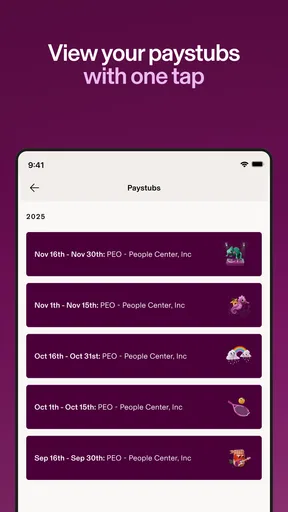
In many organizations, Rippling allows employees to review pay statements, compensation details, tax forms, and payroll-related information from the mobile app or web dashboard. However, access can vary by employer and country. Some documents may only become available after payroll is processed, and certain changes—such as updating tax withholdings or banking details—may require additional verification or approval.
Can I request time off and manage benefits through Rippling?
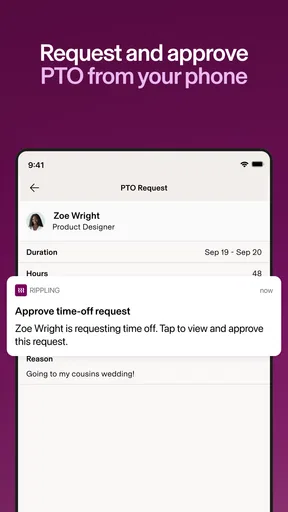
If your employer has enabled the relevant modules, you can often submit vacation, sick leave, or other time-off requests through Rippling and check approval status from your phone. The app may also provide access to benefits enrollment, plan information, and related documents. Available options, deadlines, balances, and approval rules are controlled by your company rather than by the app itself.
Does Rippling manage company devices and workplace applications?
Rippling can be used by organizations to connect employees with approved software, accounts, and company devices. Depending on your employer’s IT setup, you may receive instructions for setting up a work computer, accessing applications, completing security requirements, or reporting device issues. Because these tools are administered by your company, the level of device monitoring, permissions, and available support may differ between workplaces.
Is Rippling secure, and what should I do if I cannot log in?
Rippling handles sensitive employment, payroll, identity, and benefits information, so access generally includes account security measures such as password protection, verification steps, and possibly multi-factor authentication. If you cannot log in, first check your internet connection, credentials, and verification method, then use the available password-reset option. For locked accounts, missing access, or company-specific issues, contact your employer’s HR or IT administrator.


